
Frequently Asked Questions
Q: What Is Transferology?
Q: How Do I Use Transferology?
A: On the Transferology homepage, select Get started or Sign up to create a free account.
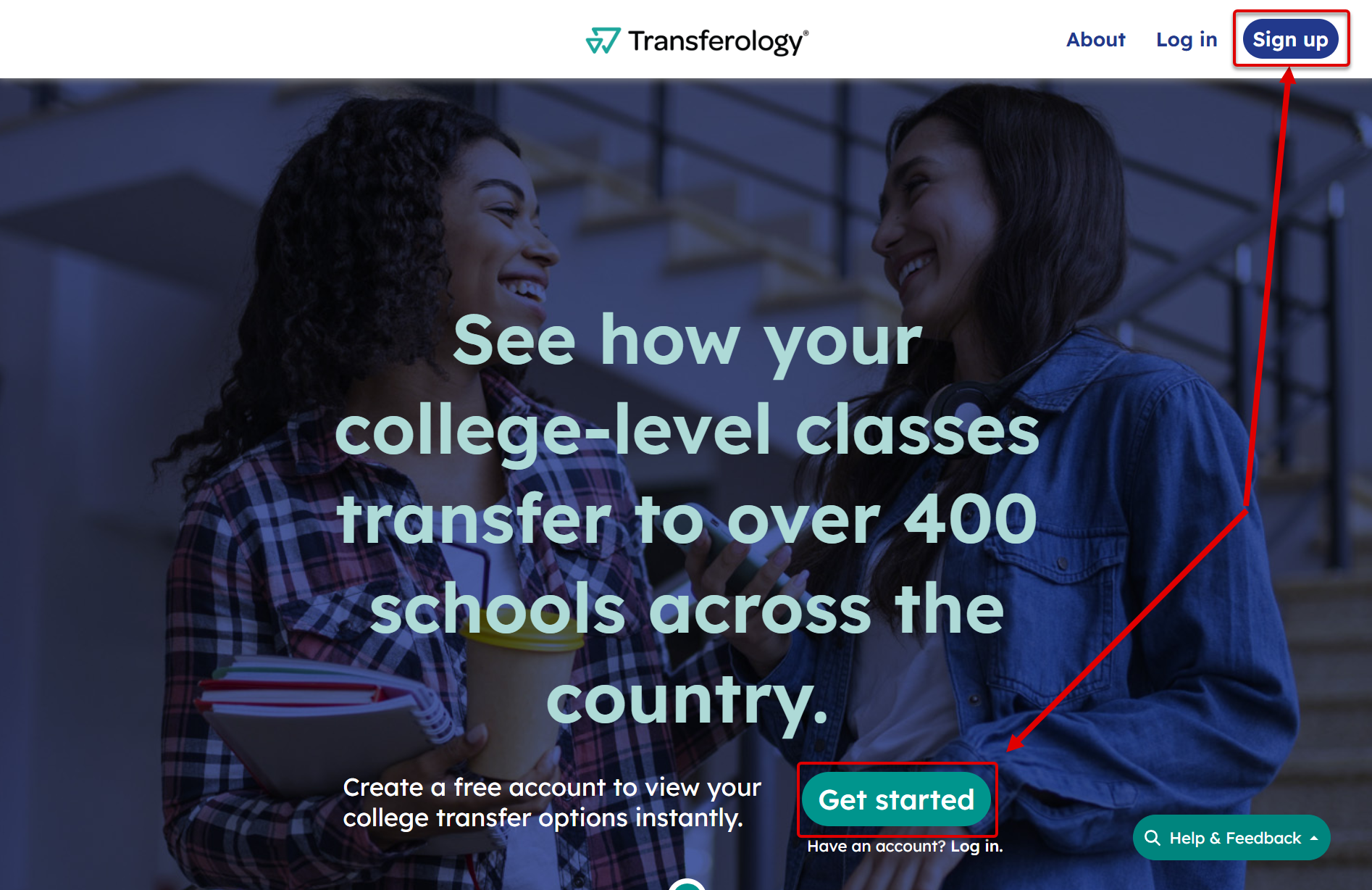
Look for these same buttons if viewing Transferology from an institution or state/system Transferology landing page. While these pages are personalized to colleges and universities to help students get to know the institution or schools within the state/system, these buttons are located in the same page areas.
Use the Will My Courses Transfer? path to determine if courses, standardized exams, and military credits will transfer to or earn credit at other schools.
- Find the school(s) you have attended and add your courses.
- If you have taken standardized exams or have military credits, you can add those as well.
- Select Search for Matches to view your search results.
- Learn more about colleges by viewing their School Profiles.
- Use the Request Information box to contact a school representative. You can also reach out through the Help & Feedback button (select Contact a School).
Select this link to view step-by-step and video instructions on how to enter courses and search for, view, and filter matches.
Use the Find a Replacement Course path to find courses at other institutions that you can transfer back to your school.
- Find the school you currently attend and add the course(s) you want to take elsewhere.
- If you are looking for courses to fulfill a requirement (such as a gen ed or liberal education category) select the + button next to the Requirement Category Name from the menu.
- Select Search for Matches to view your options.
Q: Can I Apply to Schools Through Transferology?
Q: Can Transferology Help Me Find Online Courses?
Q: I Took College Courses in High School. How Do I Add Them to Transferology?
Q: What Is a Department?
Q: Why Can’t I Find the School I Attended in Transferology?
Q: Why Can’t I Find the School I Want to Transfer to in Transferology?
Q: What Do My Search Results Mean? (Will My Courses Transfer?)
A: You can use the Will My Courses Transfer? path to find out if your courses will transfer to other schools. Once you select a school, you will see up to three tabs:
- Matches indicates how your courses may transfer (assuming they are completed with passing grades).
- Maybes indicates which courses have not been reviewed for transfer. They may or may not transfer.
- Misses indicates which courses do not transfer, as well as possible Matches if additional courses were taken.
Standardized exams or military credits entered in Transferology would also appear in these tabs.
The courses you took might match those at another school, or they might transfer another way (for example, as an elective or as meeting a gen ed or liberal education requirement). If you see an information icon or thumb next to a Match, select it to find out more.

You may see that some Matches have characters like “T**” or “***” at the end. While each institution is different, this generally means your course doesn’t have an exact match, but you are likely to receive some transfer credit.
For more information, or if you need help understanding your search results, contact the school through Request Information or the Help & Feedback button (select Contact a School).
Q: What Do My Search Results Mean? (Find a Replacement Course)
A: Find a Replacement Course helps you locate courses you can transfer back to your current school (assuming they are completed with a passing grade). After selecting a school, two tabs could appear:
Course Matches indicates the course(s) your school has identified they would award credit for in place of one they offer. For example, if you searched for a replacement for your school’s ENGL101, this tab would provide you with a list of courses your school has acknowledged could transfer back as ENGL101.
Requirement Category Match indicates the course(s) your school has identified they would award credit for in place of a degree requirement, such as a general education or liberal education category (not a particular course). For example, if you searched for a replacement to your school’s Fine Arts requirement, this tab would provide you with a list of courses your school has acknowledged you could take and transfer back to apply to their Fine Arts requirements. If you see an information icon or thumb next to a Match, select it to find out more.
Contact your current school for more information or for help with understanding your search results.
Q: What Are Favorites?
Q: How Will My Courses Apply to What I Want to Major In?
A: Some schools provide degree audits within Transferology. These show how your courses, standardized exams, and military credits would apply to a selected major. After viewing your Matches:
- Select View Program Information (on the School Profile).
- Choose the program name.
- Select See how your courses might count toward this program.
Not all schools supply program information and degree audits to Transferology. You will need to contact the institution for this information in these cases.
Q: The Program I Ran Isn’t Working. What Should I Do?
A: If you receive an error while running a program:
- Select Matches.
- Choose the school by selecting View details next to the school name.
- Within the Custom Message in the Request Information box, let the school know of the error received. You can also ask them to send you a degree audit from the program you want to see.
You may also use the Help & Feedback button (select Contact a School) to reach out to the institution.
Q: I Added More Courses, Standardized Exams, and/or Military Credits to My Transferology Profile. Will Transferology Automatically Update My Matches and Programs?
A: You can update your Match results by selecting Search for Matches.
To get an updated report of how your courses, exams, and/or military credits would apply to a program:
- Select View Program Information (on a School’s Profile).
- Choose the program name.
- Select See how your courses might count towards this program.
There’s no limit to the number of reports you can run, and each has a timestamp, so you can see which is the most recent one.
Q: Why Haven’t I Heard Back from a School I Requested Information From?
Q: I Didn’t Receive an Email I Was Expecting from Transferology. What Can I Do?
Q: How Do I Delete My Account?
Q: Why Can’t Safari Tab between Menus, Fields, and Links?
A: If you are having trouble tabbing between menus, fields, and links within your browser, you may need to enable highlighting:
- Select the Safari menu item.
- Select Settings.
- Select Advanced.
- Under Accessibility, enable the checkbox for Press Tab to highlight each item on a webpage.